Construction Specifications: What They Are and How to Manage Them (Oct 2026)
Learn what construction specifications are, how they differ from drawings, and best practices for managing specs throughout your project lifecycle. Oct 2026.
A structural drawing might call out a steel beam, but the specification is what defines the grade, the connection details, and the acceptance criteria. When spec sections get updated without corresponding drawing revisions, or when field teams pull from outdated PDFs, you get submittal delays, rejected materials, and rework that should have been caught before the order went out. Specifications matter most when they stay connected to the rest of the project, not filed away as a reference document someone opens only when there's already a dispute.
TLDR:
-
Specs define materials, installation methods, and quality standards; drawings show location and layout.
-
Four main spec types (prescriptive, performance, reference, proprietary) give you different levels of control over how subs execute work.
-
Most spec failures trace to copy-paste templates, vague performance language, or uncoordinated drawing references.
-
Conflicts between specs and drawings trigger RFIs and change orders; catch them during review before work starts.
-
Constructable links spec sections to drawing locations so field teams cross-reference requirements without hunting separate documents.
What Are Construction Specifications?
Construction specifications are the written documents that define exactly how a project gets built. Where drawings show what goes where, specs explain what materials must be used, how they're installed, and what quality standards apply.
A structural drawing might show a concrete wall. The specification covers the mix design, curing requirements, and acceptable tolerances. That level of detail doesn't fit on a sheet. Without specs, drawings leave too much open to interpretation, and on a construction site, interpretation usually costs someone money.
Architects and engineers author specifications during design, often with input from owners on performance requirements or preferred materials. The finished set becomes part of the contract documents, carrying the same legal weight as the drawings themselves.
Who Creates and Manages Construction Specifications?
Specification writing often falls to a dedicated CSI-certified spec writer on larger projects, working alongside the architect and engineers to translate design intent into precise, enforceable language. On smaller jobs, the architect of record typically takes on spec writing directly, with engineers contributing technical sections for structural, mechanical, or electrical work.
Responsibility moves once construction starts. The GC's project manager becomes the primary steward, fielding compliance questions, tracking substitution requests, and coordinating submittals against spec requirements. Superintendents enforce compliance in the field, coordinating submittal reviews with spec requirements. Owners retain review rights but rarely manage day-to-day spec work themselves.
Why Construction Specifications Matter
Specifications are the written backbone of any construction project. Without them, you have drawings that show what to build but nothing that tells crews, subs, and suppliers how to build it or to what standard.
That gap is where projects go wrong. A structural beam installed with the wrong steel grade, a waterproofing membrane applied at the wrong thickness, a mechanical system that meets the drawing layout but fails the performance requirement: these are specification failures, and they show up as rework, disputes, and schedule hits.
Specs also carry legal and contractual weight. They set the measurable standard against which work is accepted or rejected, which makes them the primary reference document in any dispute between an owner, GC, or sub.
Main Types of Construction Specifications
There are several ways to write a construction specification, and the type you choose shapes how much control you retain over the final product versus how much flexibility you hand to contractors and suppliers.
Prescriptive specifications
Prescriptive specifications tell contractors exactly what to use and how to install it. They name specific materials, manufacturers, installation methods, and quality standards. Owners and designers who want tight control over the finished product favor this approach, though it can limit competitive bidding and shift liability toward the design team if a specified product underperforms.
Performance specifications
Performance specifications define the outcome a component must achieve instead of the exact method for achieving it. A roofing system might need to meet a specific R-value and wind uplift rating without specifying the exact product. Contractors have freedom to propose solutions, which can drive cost savings, but the owner carries more responsibility for verifying that the proposed solution actually meets the stated criteria.
Reference specifications
Reference specifications pull in published standards from organizations like ASTM, ANSI, or ACI by citation instead of rewriting requirements from scratch. They keep project documents concise and lean on widely accepted industry benchmarks for quality and performance.
Proprietary specifications
Proprietary specifications name a single manufacturer or product with no approved substitutions. They are common when a design is built around a specific aesthetic or when compatibility with existing systems is non-negotiable.
Most projects combine more than one type across different spec sections, using prescriptive language where precision matters and performance language where contractor expertise adds value.
| Specification Type | What It Defines | Control Level | Best Used When |
|---|---|---|---|
| Prescriptive | Exact materials, manufacturers, installation methods, and quality standards contractors must follow | Tight control over finished product with limited contractor flexibility | Owners and designers want control over materials and methods, though it limits competitive bidding |
| Performance | Required outcome a component must achieve without prescribing the exact method to reach it | Contractors have freedom to propose solutions that meet stated criteria | Contractor expertise can drive cost savings, though owner verifies proposed solutions meet requirements |
| Reference | Published standards from ASTM, ANSI, or ACI cited by reference instead of rewritten requirements | Leans on widely accepted industry benchmarks for quality and performance | Keeping project documents concise while relying on widely accepted industry standards |
| Proprietary | Single manufacturer or product named with no approved substitutions allowed | Maximum control over specific product selection with zero contractor substitution flexibility | Design built around specific aesthetic or compatibility with existing systems is required |
How Specifications Organize Information: MasterFormat and Classification Systems
MasterFormat is the industry's shared filing system for specification content. Developed by the Construction Specifications Institute (CSI) and Construction Specifications Canada, it organizes all construction work into a numbered division structure that architects, engineers, contractors, and suppliers all recognize. Division 03 is concrete. Division 09 is finishes. Division 26 is electrical. When a spec references a section number, everyone on the project knows exactly where to look.
The system matters because it keeps specifications consistent across projects and firms. A subcontractor bidding multiple jobs doesn't have to relearn a new organizational scheme each time.
How the division structure works
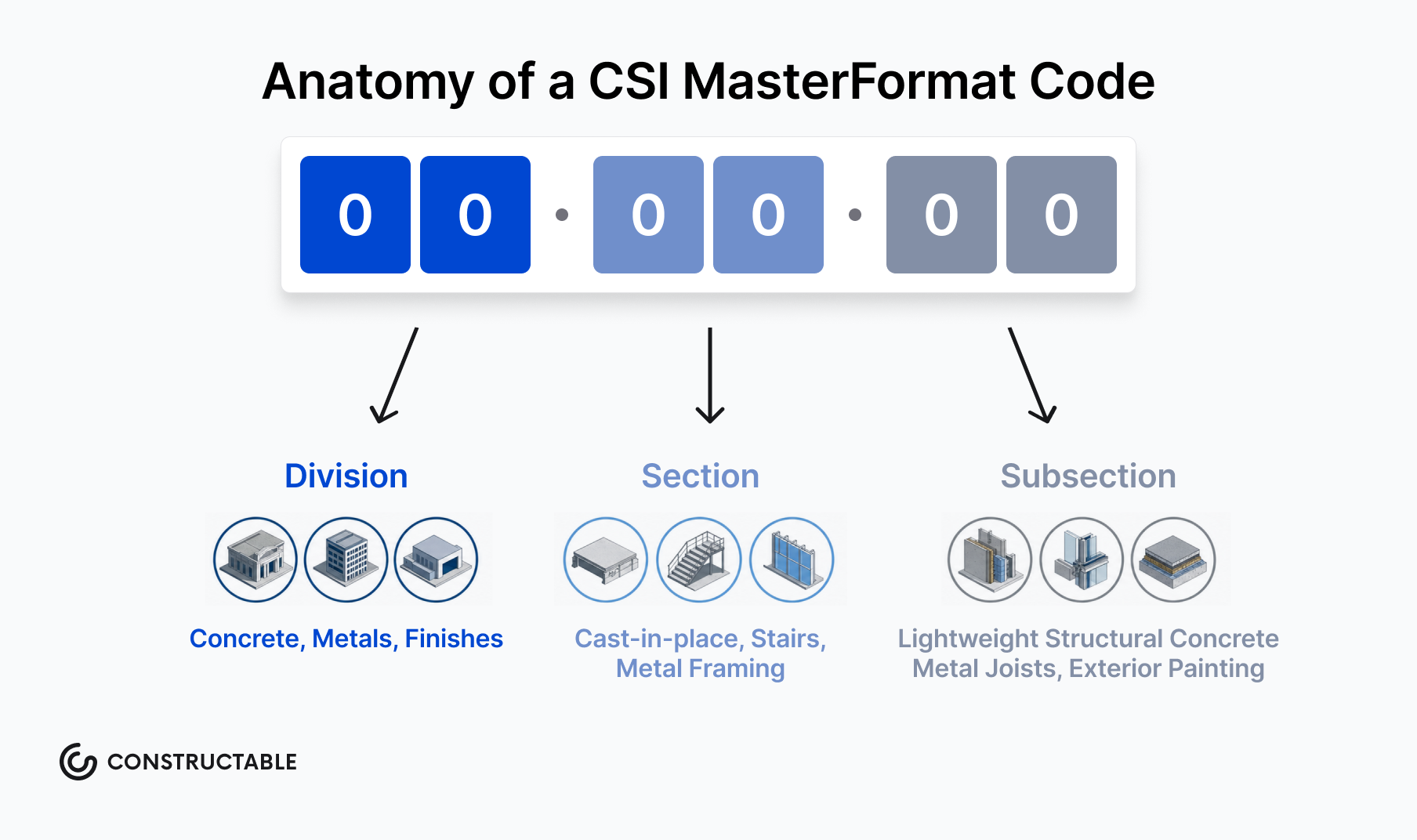
MasterFormat uses a six-digit numbering system to get increasingly specific:
-
The first two digits identify the broad division (e.g., 03 for concrete work)
-
The middle two digits narrow to a section group (e.g., 03 30 for cast-in-place concrete)
-
The final two digits pinpoint the individual section (e.g., 03 30 00 for the full cast-in-place concrete spec)
This hierarchy lets teams pull exactly the section they need without sorting through unrelated content, which matters on a project with hundreds of spec sections across dozens of trades.
Where UniFormat fits in
While MasterFormat organizes specs by work result, UniFormat organizes by building system and element, making it more useful during early design and estimating. Specs drafted during schematic design often follow UniFormat before transitioning to MasterFormat as construction documents mature. Both systems are maintained by CSI and are designed to work together across the project lifecycle.
Specifications vs Drawings: How They Work Together
Drawings show where things go. Specifications say what those things have to be.
A structural drawing might call out a concrete slab, but the spec is what tells the contractor the required compressive strength, mix design, curing method, and acceptable substitutions. Neither document works without the other. Drawings define geometry and location; specifications govern quality, materials, and performance standards.
This relationship matters most when field conditions get complicated. When a subcontractor proposes a product substitution or a material isn't available, the spec is the document everyone turns to first, often triggering an RFI to resolve conflicts between requirements and field reality.
When conflicts arise between the two
Discrepancies between drawings and specs happen, and how a contract handles them determines who absorbs the cost. Most standard contracts set a hierarchy, but the safest approach is catching conflicts during review before work starts.
-
Specs typically take precedence over drawings for material quality and performance requirements, since drawings aren't designed to carry that level of detail.
-
Drawings typically govern dimensions, layout, and quantities where the spec is silent or general.
-
When neither clearly controls, the contractor usually has to request clarification through an RFI, which adds time and can hold up work on the critical path.
Keeping specs and drawings managed together in the same system reduces the chance that an updated drawing circulates without a corresponding spec revision, or vice versa.
Key Elements Every Construction Specification Should Include
Most specification failures trace back to missing content, not bad intent. A complete spec section typically includes:
-
Scope: what work the section covers and what falls outside it
-
Material requirements: product types, grades, standards, and approved manufacturers
-
Quality standards: minimum performance thresholds and acceptance criteria
-
Workmanship expectations: installation methods and tolerances
-
Submittal requirements: what the contractor must provide for review before work begins
-
Testing and inspection criteria: frequency, methods, and who is responsible
-
Applicable codes and standards: referenced ASTM, ACI, or other governing documents
-
Installation procedures: sequence, site conditions, and any special requirements
-
Project-specific conditions: site constraints, phasing, or owner-specific restrictions
Each element closes off a potential gap. Leave any one out and a substitution request has a way of turning into a scope dispute.
How to Write Effective Construction Specifications
Good specs communicate clearly to the people who actually execute the work. A spec written primarily for other designers reads very differently than one a framing crew or mechanical sub will use in the field, and closing that gap takes deliberate choices.
A few practical principles hold across most project types:
-
Write for the installer. Contractors need procedural clarity: sequence, prerequisite conditions, and what to do when a specified product is not available.
-
Keep terminology consistent across sections. Calling the same assembly two different names in two different sections will produce the wrong material order, the wrong installation, or a legitimate dispute over scope.
-
Coordinate specs with the drawings. Conflicts between the two documents are one of the most common sources of RFIs and change orders. The spec should extend what the drawing shows, not contradict it.
-
Avoid copy-paste defaults. Master spec templates are useful starting points, but sections left unedited for a project's actual conditions create ambiguity that ends up in the field at the worst possible time.
Common Specification Errors and How to Avoid Them
Specification errors tend to cluster in predictable places. Knowing where they show up is half the battle.
Here are the most common mistakes teams make and what to do instead:
-
Copying specs from a previous project without reviewing them against the current scope, site conditions, or updated product availability. What worked on a tilt-up warehouse will not necessarily apply to a wood-frame multifamily build.
-
Writing performance requirements that are too vague to enforce. If a spec says "contractor shall provide adequate waterproofing," there is no baseline to inspect against or hold anyone accountable to.
-
Failing to coordinate specs with drawings. When the drawings show one product and Division 09 references another, subs are left guessing, and that guess usually costs someone money—a coordination problem that modern drawing management systems are designed to prevent.
-
Leaving proprietary specs in place when substitution is allowed. If you accept substitutions but have not written substitution procedures into the spec, you will get unvetted materials showing up on site.
-
Not updating specs after addenda or change orders, leaving teams working from disconnected versions. The contract documents need to stay synchronized, or you end up with a closeout package that does not reflect what was actually built.
The fix for most of these is process, not effort. A spec review checklist tied to each project phase, a clear owner for spec coordination, and a habit of cross-referencing specs against the current drawing set before bid goes a long way toward catching errors before they become RFIs or disputes.
Managing Specifications Throughout the Project Lifecycle
Specifications don't live in a single moment. They get written before the project starts, referenced constantly during construction, and revisited when something goes wrong. Managing them well across all three phases is where most teams either hold the project together or watch it fray.
Before construction begins, the focus is on getting specifications right: coordinating between the design team, owner, and GC to catch conflicts before they hit the field. During construction, the job becomes making sure the right spec version is in the right hands at the right time. After substantial completion, specs become the baseline for resolving disputes, processing warranty claims, and documenting what was actually built.
Common breakdowns by phase
Most spec-related problems trace back to a handful of recurring failures:
-
Specifications written in isolation from the drawings, so conflicts between the two go undetected until a sub flags them through an RFI mid-pour or mid-install.
-
Addenda and revisions that get distributed to some parties but not others, leaving parts of the team working off outdated requirements that later surface as change order disputes.
-
Shop drawing and submittal reviews that reference the wrong spec section, slowing the approval cycle and creating compliance gaps.
-
Closeout documentation that doesn't match what was actually specified, creating friction during owner turnover.
Getting ahead of these problems means treating specs as a live document throughout the project, not a PDF that gets filed after bid day and opened again only when there's a dispute.
How Constructable Simplifies Specification Management
Specification management is one of those back-office functions that causes outsized problems when it breaks down. Documents get revised without notice, teams pull from outdated PDF versions, and by the time someone catches a conflict between a spec section and the drawings, the work is already in the wall.
Constructable keeps specifications connected to the rest of the project instead of siloed in a shared drive, functioning as a unified construction management system instead of a collection of separate tools. When a spec section is updated, the change is visible to the whole team in context, not buried in an email thread or a renamed file.
A few things this changes in practice:
-
Spec sections stay linked to relevant drawing locations through drawing-centric workflows, so field teams can cross-reference material requirements directly against the plans without hunting through separate documents.
-
Submittal reviews tie back to the governing spec section, so reviewers are checking against the right standard from the start instead of relying on memory or a separate tab.
-
Version control is automatic, meaning teams always know which revision is current without manually comparing filenames or dates.
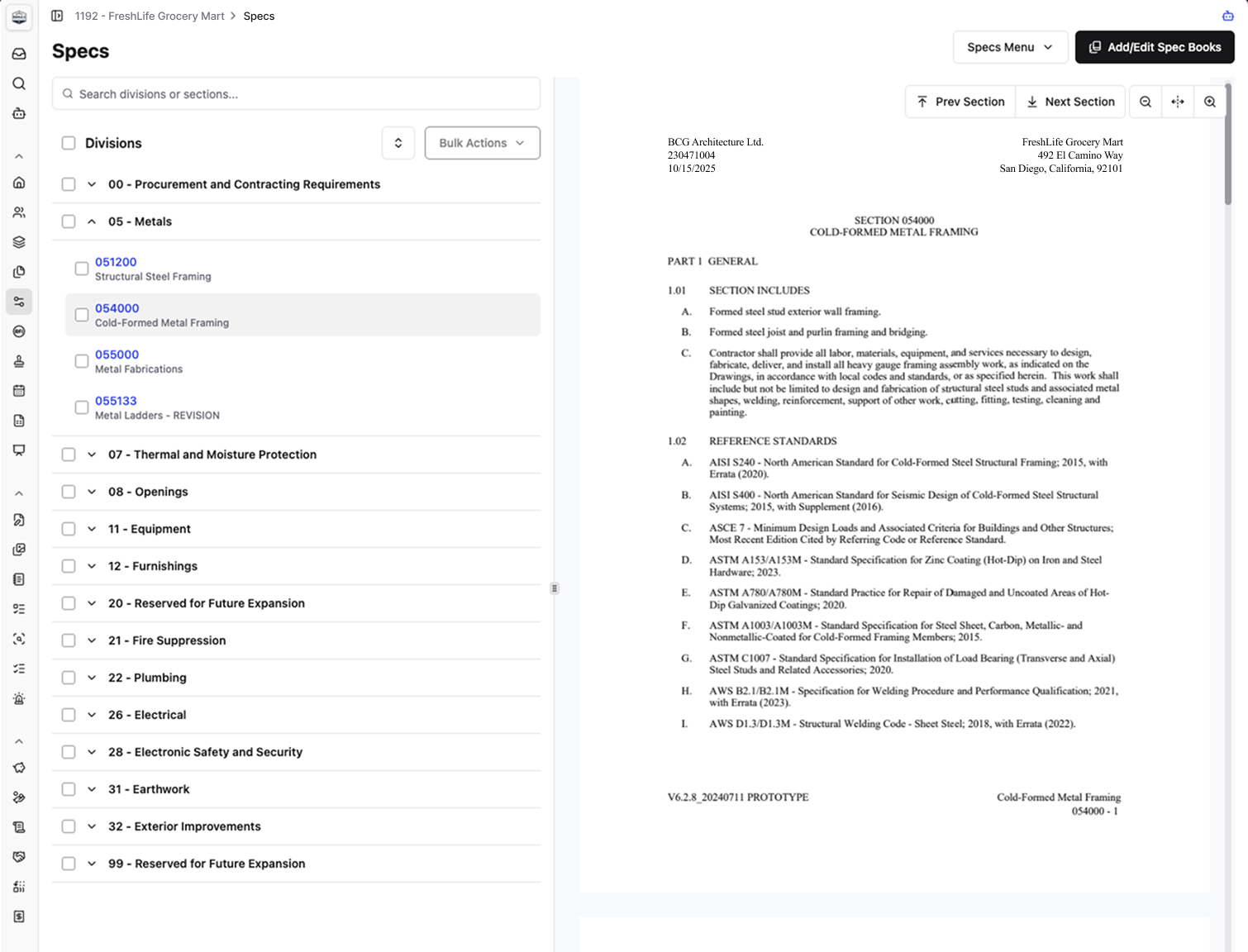
A screenshot showing the easy-to-navigate Specs viewer in Constructable
When it's time to get submittals approved, the Constructable Agent handles the first pass. Its one-click Submittal Pre-Check skill automatically reviews submittal documents against the project's spec book and flags anything that needs further review. Reviewers start from a short list of items worth a closer look, not a cold read of every product data sheet, so a missed spec requirement gets caught before it turns into a revise-and-resubmit cycle.
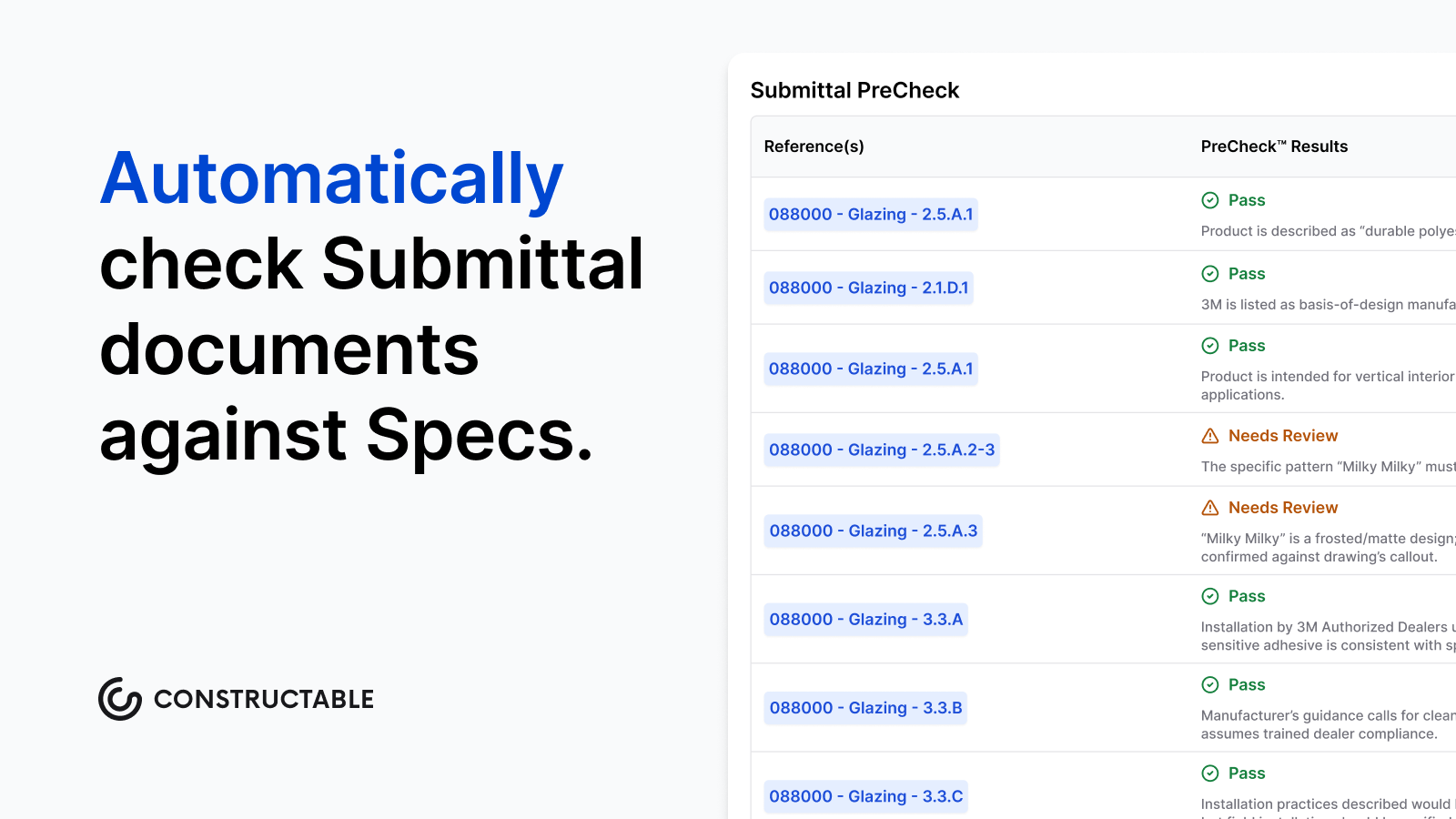
The result is fewer scope disputes, fewer rework cycles, and less time spent tracking down which document is authoritative. Specification management stops being a coordination liability and starts working the way it was always supposed to: as one part of a connected project management system that keeps the whole team in sync.
Final Thoughts on Specifications in Construction
Specs do the heavy work that drawings can't: defining quality, materials, and the exact standards your project has to meet. But that only matters if your team can actually find the current version, cross-reference it with the right drawing, and know what changed since last week. Most spec problems aren't writing problems, they're coordination problems, and coordination breaks down when documents live in different systems. Constructable keeps specs tied to the rest of your project so nothing falls through the cracks. Set up a time to talk if you want to see it work.
FAQ
What is the purpose of specifications in construction?
Specifications define exactly how a project gets built: what materials must be used, how they're installed, and what quality standards apply. They carry the same legal weight as drawings and provide the written standard against which work is accepted or rejected, making them the primary reference document in any dispute between owners, GCs, or subs.
Performance specification vs design specification in construction?
Performance specifications define the outcome a component must achieve (like a roofing system meeting a specific R-value) without prescribing the exact method, giving contractors flexibility to propose cost-effective solutions. Prescriptive (design) specifications tell contractors exactly what to use and how to install it, naming specific materials and manufacturers for tight control over the finished product.
How do I write specifications for a construction project?
Write for the installer with clear procedural language about sequence and site conditions. Keep terminology consistent across sections, coordinate specs against current drawings to avoid conflicts, and customize master spec templates for your project's actual conditions instead of leaving copy-paste defaults that create field ambiguity.
What are the main types of specifications in construction?
The main types are prescriptive (exact materials and methods), performance (required outcomes without prescribing method), reference (citations to published ASTM/ACI standards), and proprietary (single manufacturer, no substitutions). Most projects combine multiple types across different spec sections based on where precision matters versus where contractor expertise adds value.
Can specifications and drawings contradict each other in construction?
Yes, and when they do, most contracts set a hierarchy where specs typically govern material quality and performance requirements while drawings control dimensions and layout. The safest approach is catching conflicts during review before work starts, since unresolved discrepancies force contractors to submit RFIs that add time and can hold up critical-path work.